


Catch Tiles: Piano Game
4.51.00K Reviews
App Specs
- Version
- 2.2.2
- Updated On
- License
- Free
- Downloads
- 50,000,000+
- Developer
- WingsMob
- Categories
- Music
- Platform
- Android, iOS
Screenshots
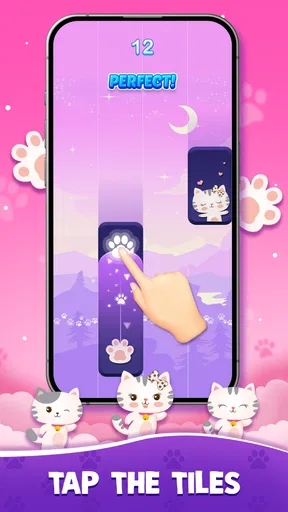
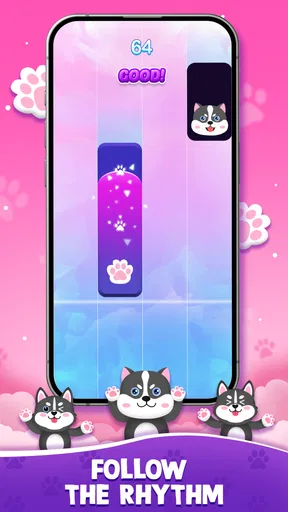
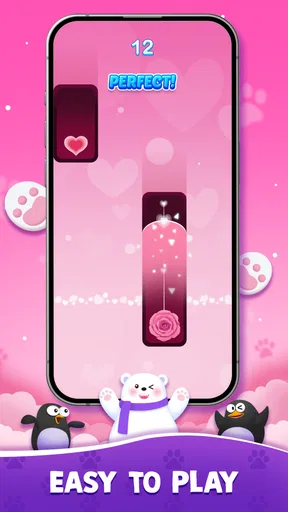

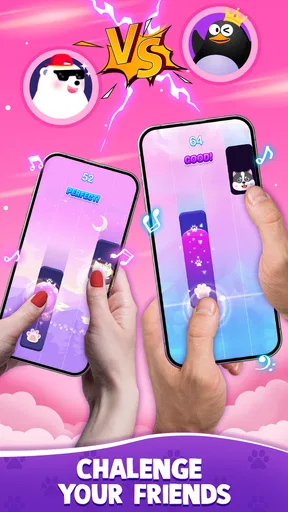
 Analysis by AppCompare
If you want a music game that asks you to pay attention rather than simply listen, Catch Tiles: Piano Game is an easy one to understand and a surprisingly demanding one to keep playing. I like it best as a short, focused rhythm challenge: follow the falling notes, react in time, and see whether you can hold your concentration as the pace picks up. It is less suited to someone looking for a full piano lesson or a relaxed music player, but it can make a spare few minutes feel active.
WingsMob’s game is free to download, with optional in-app purchases listed from $0.99 to $9.99 per item. That gives you a useful starting point when deciding whether its style is worth trying, but it does not tell you what each purchase provides or whether any particular item is necessary. I would treat spending as optional until you have played enough to know what you want from the game, rather than assuming a purchase is required to enjoy the basic rhythm challenge.
What the purchase details tell you—and what they don’t
The confirmed price range is the clearest way to approach the spending question: individual in-app items fall between $0.99 and $9.99. I can’t responsibly turn that into a claim about song packs, retries, removing ads, or a subscription, because those details aren’t established here. The sensible move is to check the item description and checkout screen before buying anything, and to decide whether that specific offer solves a problem you actually have.
That distinction matters in a game built around repeated attempts. If you are enjoying the timing challenge, it is easy to feel that one more run—or one purchase—might help you progress. I recommend setting your own limit before playing if you are prone to impulse spending. The game is listed as free, so there is no need to pay just to give it a try; whether optional purchases add enough value is a personal decision.
Getting Started
As soon as I downloaded Catch Tiles: Piano Game, I was eager to start tapping away. The setup was a breeze—no complicated sign-ups or permissions needed. Just a quick download, and I was ready to go. The app’s interface is sleek and user-friendly, which made navigating through the menus a piece of cake.
The game offers a variety of songs right from the start, ranging from classical to pop. I was pleasantly surprised to see some of my favorite tunes in there, and it was exciting to see how they would translate into gameplay. The anticipation of playing against the rhythm of familiar melodies adds an extra layer of fun.
Gameplay Experience
The core of the game is simple: tap on the tiles as they scroll down the screen in time with the music. But don't be fooled by its apparent simplicity. The further you progress, the faster those tiles come flying at you!
Worth Reading Before You Choose

Flipboard Shows What News Apps Must Do Beyond the Feed

Switching to Android Auto Means Rethinking Your Driving Routine

Google Calendar Makes a Crowded Week Easier to Manage

Ludo King Makes the Most of the Minutes Between Plans

Baby Panda World Brings Quick Play to Modern Phones, but Its Game Library Feels Busy

ESPN’s Live Game View Makes Following Close Games Easier
What I really enjoyed is how the game manages to balance challenge with enjoyment. At first, I was just having fun playing the easier levels, but as I got better, I started craving more complex beats. The game seems to understand this progression, and it does a fantastic job of gradually increasing the difficulty.
One of the standout features for me is the inclusion of a multiplayer mode. It adds a whole new dimension to the game. Competing against friends or random players online is thrilling, and it definitely amps up the stakes. There's something incredibly satisfying about beating someone else to the rhythm of a catchy tune.
Gameplay, progress, and competitive pressure
The fast-tile format rewards a particular kind of practice: short sessions where you focus on timing rather than trying to play for a long stretch. I get more out of it when I treat a difficult run as a small exercise—notice where my attention slips, pause, then try again—rather than tapping faster in a panic. If a section feels suddenly impossible, a short break can be more useful than immediately repeating the same attempt with tense hands.
For a realistic everyday use, imagine waiting for a ride or taking a quick break between tasks. A song can give that pause a clear beginning and end, while the rising pace makes the session feel engaging. The trade-off is that this is not ideal when you need to divide attention: watching tiles and keeping time demand focus, so I would avoid playing while walking, crossing a street, or doing anything that needs your eyes and hands elsewhere.
One practical tip is to prioritize the beat over the visual rush. The tiles are the immediate cue, but listening for the rhythm can help you anticipate the next input instead of reacting at the last instant. I also find it useful to keep taps controlled rather than striking the screen hard; frantic movement makes accuracy harder and can tire your hands. These habits won’t turn every difficult passage into an easy one, but they make retries more deliberate.
The practice mode mentioned in the original experience is especially useful when a tricky passage keeps breaking a run. Rather than treating it as a way to chase a score, use it to isolate the part of the song that unsettles your timing, then return to a normal attempt once the sequence feels familiar. That workflow is a better fit for patient players than for anyone who expects a game to explain music theory or teach keyboard technique.
Multiplayer changes the mood from personal improvement to comparison. I enjoy that extra pressure when I want a reason to focus, but it is not automatically the best way to learn a difficult pattern: another player’s result can distract from your own timing. I would first get comfortable with a song alone, then use competition as a fun test rather than as the measure of whether I am improving.
How it fits among music games
Compared with a music streaming app, this is an interactive game, not a way to choose an album and let it play in the background. Compared with a conventional rhythm game that may emphasize a broader range of input patterns or instrument-style controls, Catch Tiles keeps its appeal centered on tapping moving tiles in time. That directness is welcoming, though it also means it may feel repetitive if you want elaborate mechanics, free-form playing, or a genuine piano-learning course.
It is a good match for casual players who enjoy recognizable melodies, quick reactions, and the satisfaction of improving through retries. It may also suit someone who already likes rhythm games and wants a straightforward mobile option rather than a complex setup. I would steer away if your main goal is to learn sheet music, build piano technique, or listen without interacting; a dedicated lesson app, instrument-learning tool, or music player would serve those aims better.
There is also a useful distinction between challenge and fairness. A rising difficulty can make progress feel earned, but competitive results are only meaningful when the players are facing comparable conditions. The presence of multiplayer establishes that players can compete; it does not, by itself, establish how opponents are matched, whether every song is equally familiar, or how scores are handled. I would enjoy the mode for the contest itself without assuming it proves who has the stronger musical ability.
Fair play and the limits of what is known
The game has an average rating of 4.5 from around 131,000 ratings, and it has passed 50 million installs. Those figures suggest it has reached a large audience, but popularity is not a guarantee that every player will enjoy the same songs, difficulty, or competitive experience. I would use the game’s basic feel—whether the taps make sense to you and whether retries stay enjoyable—as a better guide than its overall reception.
There are a few details I would want to inspect in the app before making a firm judgment about spending or competition. The listed purchase range does not identify what each item unlocks, and the existence of multiplayer does not explain matching or scoring rules. That is not a reason to assume anything is unfair; it is simply a reason to read the relevant screens carefully and avoid paying or competing on the basis of expectations the game has not made clear to you.
Graphics and Sound
The graphics are clean and visually appealing without being too distracting. The focus is, after all, on the music, and the simple aesthetic complements this perfectly. The tiles are easy to spot, and the animations are smooth, which is crucial for a game that demands precise timing.
When it comes to sound quality, Catch Tiles: Piano Game doesn't disappoint. The audio is crisp, and the songs are well-produced. Whether you're playing a classical piece or a pop hit, the sound quality remains consistently good, enhancing the overall experience.
Because timing and sound work together here, I would choose a quiet moment for a first session and pay attention to whether the audio cues help you anticipate each tap. If you are playing somewhere noisy, the visual rhythm may become more important, but the game is still asking you to coordinate what you see with what you hear. That makes it a less natural choice for a loud commute than a game that can be enjoyed without listening closely.
The Learning Curve
While the game is easy to pick up, mastering it is another story. It requires a good deal of concentration and quick reflexes, especially in the higher levels. But that’s part of the charm. Each time I missed a tile, I found myself wanting to dive back in and try again. It’s addictive in the best way possible.
Thankfully, the game offers a practice mode where you can hone your skills without the pressure of scoring. This feature is a lifesaver for those tricky sections that you just can't seem to nail down.
For a new player, I would begin with the easier material and resist the urge to judge the whole game by one missed run. Rhythm games can feel unforgiving when your fingers are tense, and a calm retry often tells you more than a burst of rapid tapping. If you find that the challenge is making you annoyed rather than curious, that is a fair sign to stop; not every short-session game needs to become a personal score chase.
The app is marked for Teen audiences, which is useful context for families choosing a game, though that label alone is not a complete guide to whether it suits a particular player. I would still review the on-screen purchase choices with a younger player and agree on spending expectations in advance. The free entry point makes trying the game straightforward, but the presence of paid items is worth keeping in mind.
Compatibility and a practical decision
The current version is 2.2.2, and the listed minimum operating system is 7.1. Before downloading, I would check that your device meets that requirement and has enough room for another game. The title is free to start, but optional purchases mean it is worth deciding up front whether you want to keep all spending at zero or consider an item only after checking exactly what it offers.
My simplest test is to play a few sessions and ask three questions: do I enjoy following the tiles, do I want to retry when I miss, and do the songs keep me engaged? If the answers are yes, the game’s quick rhythm loop is doing its job. If what you really want is a structured piano curriculum, reliable competition rules, or a passive way to hear music, those are better reasons to choose another kind of app.
Final Thoughts
All in all, Catch Tiles: Piano Game is a delightful experience for anyone who enjoys rhythm games. It's accessible enough for beginners to jump in and have fun but challenging enough to keep seasoned players engaged. The combination of a rich song library, engaging gameplay, and competitive multiplayer mode makes it a standout in the music game genre.
If you're looking for a game that blends fun and challenge, this one is definitely worth checking out. So, go ahead, give it a try, and let the music guide your fingers!
My recommendation comes with a simple qualification: approach it as a focused tapping game, not as a piano tutor or a promise of perfectly balanced online contests. WingsMob’s title is free, its purchase options have a stated range, and the game’s quick rhythm loop is easy to sample before deciding whether it belongs on your phone. For me, that makes it worth trying if you enjoy music-led reflex challenges—and easy to skip if the pressure to react is the part you dislike.
Pros
- Engaging and addictive rhythm gameplay.
- Wide variety of songs to choose from.
- Responsive touch controls for precision.
- Visually appealing graphics and design.
- Regular updates with new content.
Cons
- Contains ads that can interrupt play.
- Some songs locked behind paywalls.
- Requires internet for full features.
- Can be challenging for beginners.
- Limited offline functionality.
FAQs for Catch Tiles: Piano Game
What is Catch Tiles: Piano Game and how does it work?
Catch Tiles: Piano Game is a rhythm-based game where players tap on piano tiles that scroll down the screen in sync with music. The goal is to accurately tap the tiles without missing any, keeping up with the tempo of the song. The game offers various levels and songs to challenge players of all skill levels.
Is Catch Tiles: Piano Game free to play?
Yes, Catch Tiles: Piano Game is free to download and play. However, it may offer in-app purchases that provide additional songs, features, or the removal of ads. These purchases are optional, and the core gameplay experience is accessible without spending money.
What types of songs are available in Catch Tiles: Piano Game?
Catch Tiles: Piano Game features a diverse collection of songs ranging from classical pieces to modern hits. Players can enjoy a variety of genres, ensuring there’s something for everyone. The game frequently updates its song library, providing fresh content and keeping the gameplay experience exciting.
Can I play Catch Tiles: Piano Game offline?
Yes, Catch Tiles: Piano Game can be played offline. This makes it convenient for players who wish to enjoy the game without needing an internet connection, whether they are on the go or in areas with limited connectivity. However, some features, such as updates or new song downloads, may require internet access.
What devices are compatible with Catch Tiles: Piano Game?
Catch Tiles: Piano Game is available for both Android and iOS devices. It is compatible with most smartphones and tablets that meet the necessary operating system requirements. Players should ensure their device is updated to the latest OS version for optimal performance and gameplay experience.


